I Built an AI Life Manager at Hacktoberfest, and Somehow Came 5th
LifeOS started as a dumb idea about screenshots and turned into a multimodal AI assistant that reads all my schedules at once. I built it at Hacktoberfest Hack Day Surat 2026, placed 5th, and came home with an Arduino Uno Q 4GB. This is the whole story: the problem, the architecture, the demo, and what I would honestly do differently.
I Built an AI Life Manager at Hacktoberfest, and Somehow Came 5th
Introduction
I went to Hacktoberfest Hack Day Surat with one track record this year: collecting screenshots and then forgetting they existed.
I had a limited amount of time once the clock started, and I did not want to build another generic chatbot. I had watched too many of them win "best use of LLM" awards for asking a prompt and copying the answer. What I wanted was something meaningful.
The idea came from a very real problem. How many screenshots, WhatsApp messages, emails, schedules, and deadlines do I actually have to keep track of? My calendar has some of it. My to-do list has none of it. My brain files the rest under "deal with it later."
So I built LifeOS. The tagline, which started as a joke and I am sticking with it:
Your life is messy. Your plan doesn't have to be.
This is the story of what LifeOS is, how it actually works, and how I managed to leave Surat with 5th place and an Arduino Uno Q 4GB. Spoiler: the Arduino part confused me more than the hackathon judging did.
The problem
Modern life contains information everywhere. Assignments live in one portal. Group chats live somewhere else. Exam schedules come as PDFs. Interview confirmation sits in an email you screenshotted because you were afraid it would disappear. Personal notes go to a random sticky app you opened twice.
The problem is not that the information is unavailable. The problem is that it is disconnected.
OCR can read a screenshot. A summarizer can summarize a message. Both are useful, and neither solves the actual problem. The useful part is the connection between pieces.
Here is the example that kept me up the night before the hackathon:
A group chat says the model training needs to be finished first.
An assignment says the final submission is due the next day.
Neither piece alone tells you anything new. Together, they create a dependency. "Finish model training first" is the only correct instruction, and no single screenshot contains it. It only exists in the relationship between the group chat and the assignment page.
Any tool that treats each image independently will miss it.
The idea: LifeOS
LifeOS is a multimodal AI personal manager that turns scattered information into an actionable plan.
The intended workflow is simple:
- You upload screenshots.
- LifeOS analyzes them together as one set.
- It extracts tasks, deadlines, events, and relevant context.
- It identifies dependencies and potential conflicts.
- It generates a prioritized action plan.
- You can ask questions about the resulting context.
The important part, and this is what I want people to understand about the whole project: the value is cross-document reasoning, not OCR and not summarization. Reading the text is easy. Understanding that the fest collides with the report deadline because both fall on October 7 and 8 is the product.
Why Gemma 4
The hackathon had a "Best Use of Gemma 4" challenge, and that challenge pointed directly at my idea.
Gemma's multimodal capability is the reason LifeOS works the way it does. Instead of calling the model five times on five images, LifeOS sends every selected image in a single multimodal request. The model sees the assignment page, the chat, the schedule, the invite, and the email at the same time, in one shared context, and reasons across them.
Here is the pipeline conceptually:
Images
  -> Gemma 4
  -> structured information
  -> deterministic planning
  -> conflicts / dependencies
  -> prioritized plan
This is important for a second reason. It forces a clean split. Gemma extracts facts. Deterministic code decides what to do with those facts. I will say this again later because the line matters:
The model reads. Python decides.
I am deliberately not going to tell you Gemma autonomously manages my life. It reads. What I do with what it reads is the product.
The tech stack
I kept the stack boring. No microservices. No framework for every letter of the acronym. Here is what ended up in the repo:
- Gemma 4: the model. It reads all images in one multimodal request and returns structured extraction.
- Gemini API: access layer. Keys live in a backend
.envand never leave the process. - LangChain: the model interaction layer.
ChatGoogleGenerativeAIbuilds the two chains: one multimodal analysis chain and one text-only chat chain. - FastAPI: a thin API layer between the UI and the model. Three routers:
/api/analyze,/api/chat, and an iCalendar export. - Pydantic: the structured contract. The model response must satisfy
LifeOSAnalysisbefore it can reach the UI, so a malformed model response can never leak through. - Python: the backend, obviously.
- Next.js 16 + React 19 + TypeScript: the frontend. I did not want to spend two hours fighting build tooling.
- Tailwind CSS: styling without writing CSS.
Practical choices, each with a one-line reason. FastAPI because I wanted a small, typed API layer. LangChain because the alternative would have been hand-rolling the Gemini request and response parsing for no benefit. Next.js because it gives me a usable UI in minutes.
The architecture
One frontend, one API, one model, one planner. No queues, no workers, no agents talking to each other.
Next.js / React UI
        |
FastAPI  POST /api/analyze (multipart, up to 5 images, 10 MB each)
        |
LangChain  (one request, every image in the same context)
        |
Gemma 4 -> structured extraction (validated with Pydantic)
        |
planner.py  (pure Python: priorities, conflicts, dependencies)
        |
results  ->  UI: summary, conflicts, plan, calendar export, chat
The separation that matters the most is between AI reasoning and deterministic planning. Gemma has senses. planner.py has none. planner.py knows dates, times, priorities, and arithmetic, and it uses exactly that to order tasks and flag conflicts. It never calls a model. Its own docstring says the intent: no model call happens anywhere in that file, and that is the point.
This is the design choice I would keep even in a production version. The model is genuinely good at reading. It is a terrible referee for scheduling. Deterministic code is the referee.
The demo
The demo used five sample screenshots that I also committed to the repo under demo/samples/: an assignment page, a group chat, an exam schedule, a college event invite, and an interview email.
The extraction it produced:
| Source | Extracted |
|---|---|
| Assignment page | Report due Oct 7, 11:59 PM |
| Group chat | Model training must finish before the report |
| Exam schedule | DBMS exam Oct 9, 10 AM |
| College invite | Fest runs Oct 7-8 |
| Interview email | Interview Oct 8, 11 AM |
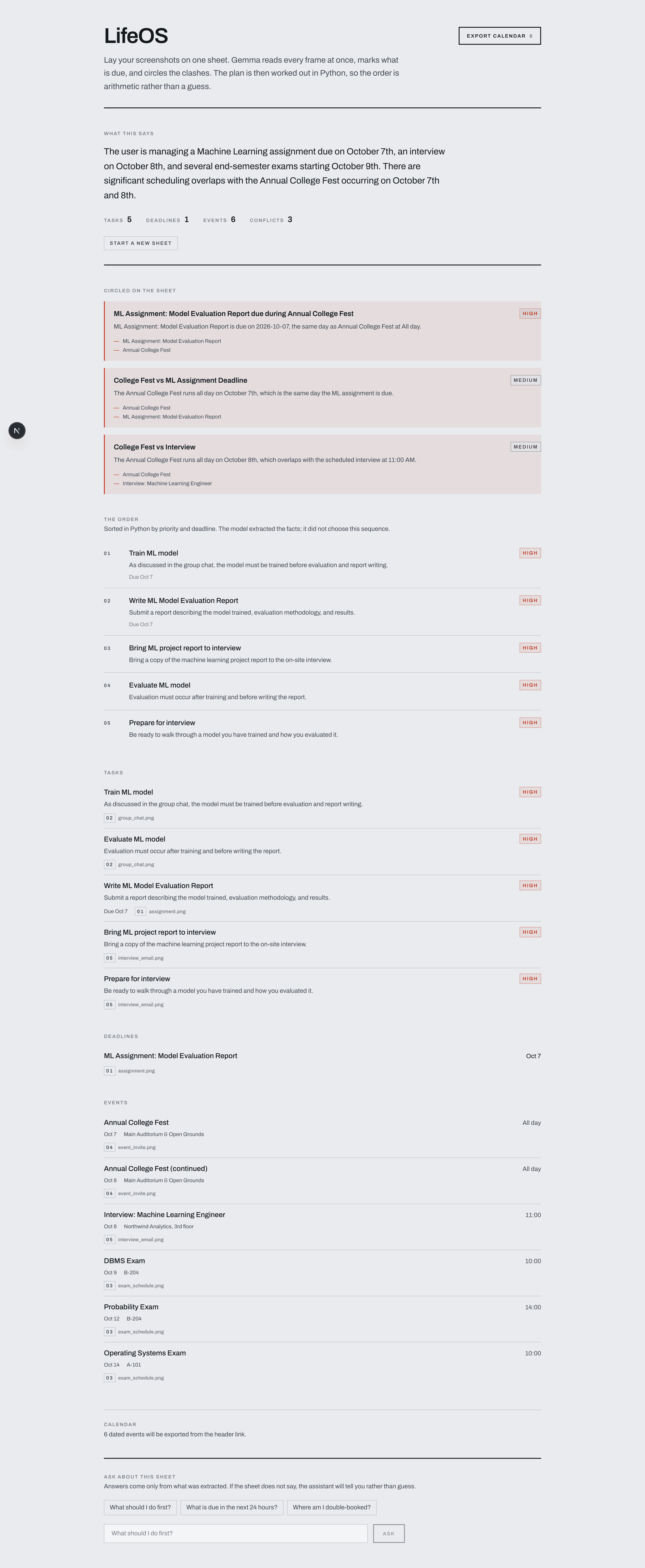
Under the hood, this whole sheet came back from one multimodal request:
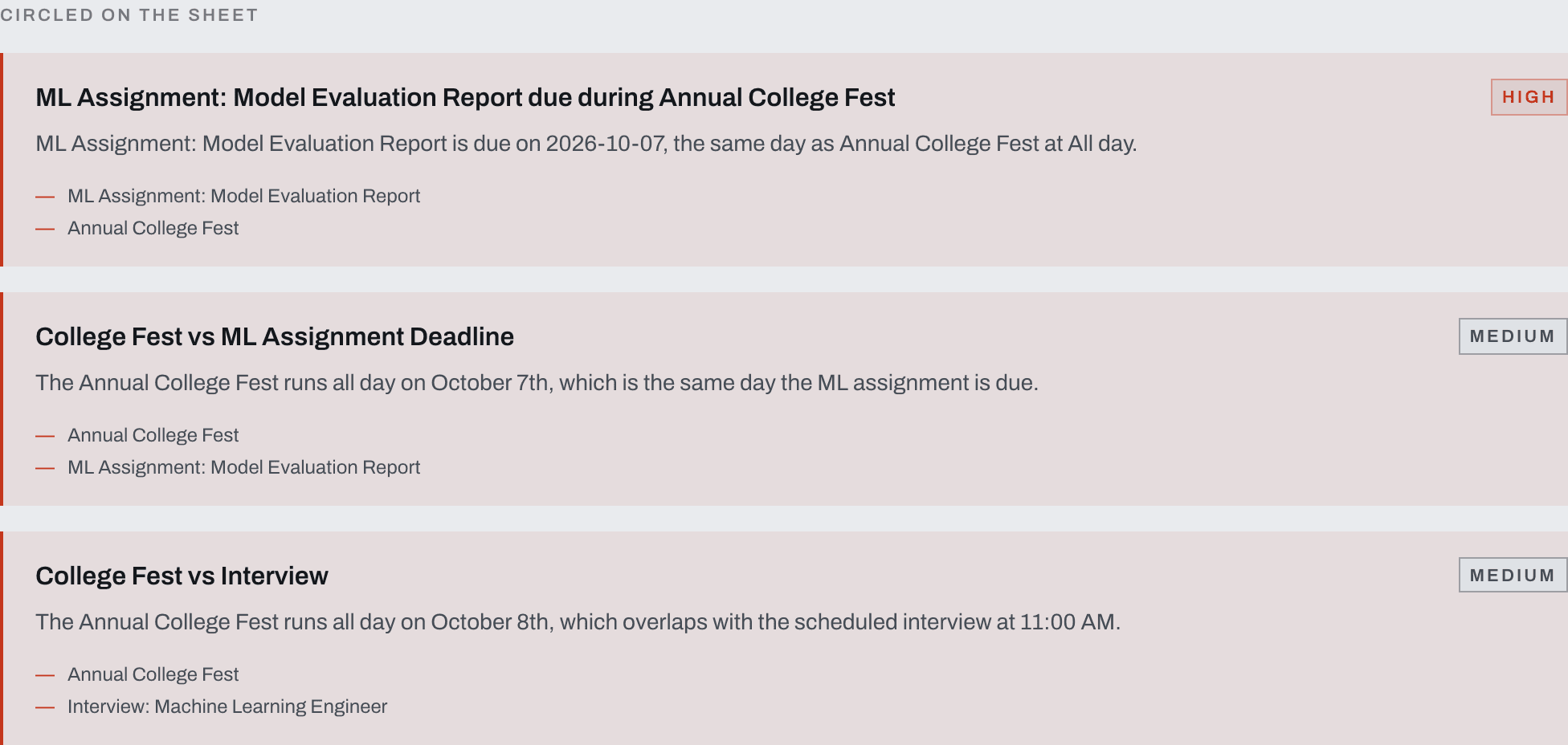
Then the part that made the demo land: the conflicts. The report is due on the first day of the fest. The interview is the morning after the deadline. The fest takes both days. Any single screenshot is innocent. Together they are a week colliding with itself.
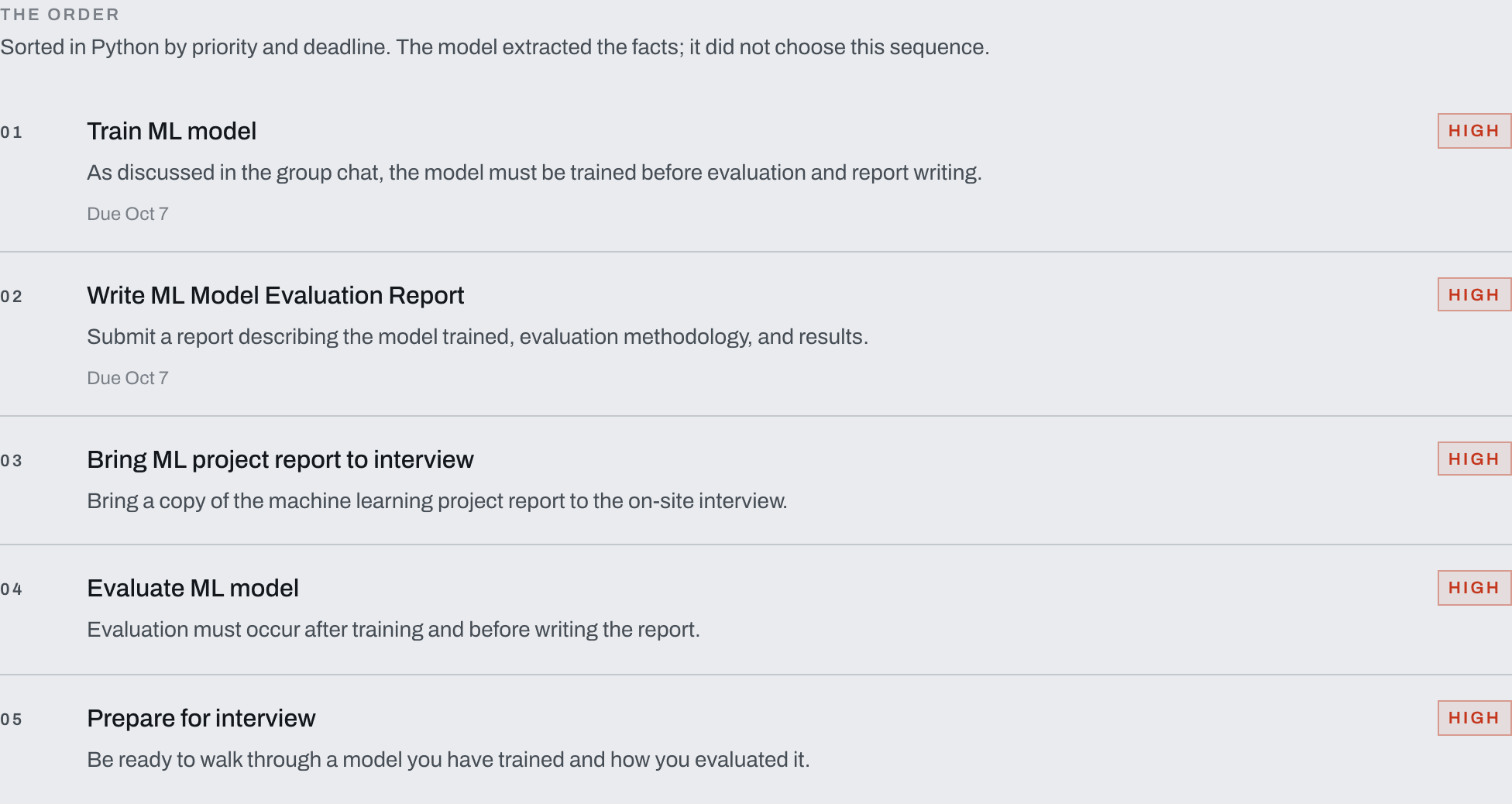
Then the plan. "Train ML model" first, because model training is a dependency of evaluation and report writing. Then the interview. Then the report. Then evaluation.
This was a much better demo than showing "the model reads text from an image." It walked into the room. It showed what LifeOS does with the screenshots together.
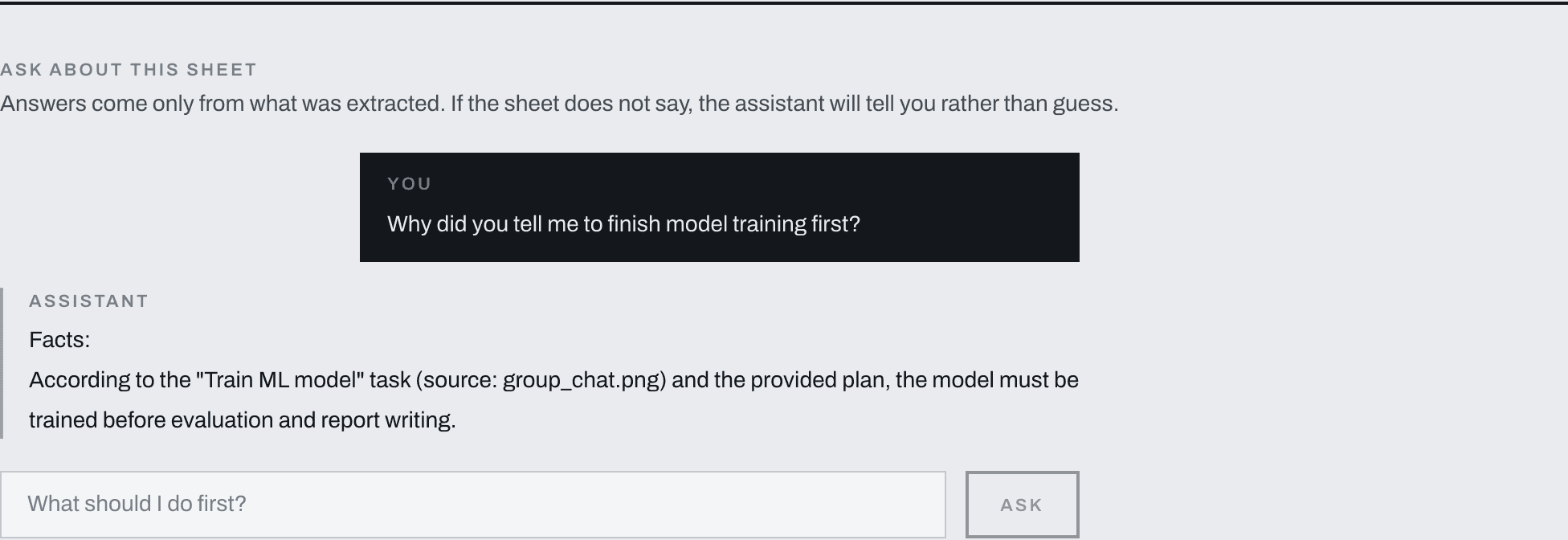
Finally, the follow-up question. You can ask "Why did you tell me to finish model training first?" and the answer is grounded in the uploaded information. The group message said the model has to be trained before the report. The assignment says the report is due the next day. The dependency is right there in the two images. The answer is assembled from them, not generated from scratch.
If you want to try it yourself, the live demo is still up: https://life-os-one-amber.vercel.app/
Building it under time pressure
Two hours of development plus one hour of refinement. That was the constraint.
I want to be honest about the scoping that had to happen. A lot of the following did not make it into the build:
- No database. Everything lived in memory for the session.
- No authentication. The upload endpoint did not care who you were.
- No Gmail, Google Calendar, or Slack integration. The data came in as screenshots only.
- No vector database. There was nothing to retrieve from a vector store; the "memory" was the uploaded set itself.
- No background workers. No queues. One request, one result.
- No multi-agent architecture. Nothing with roles and standup meetings.
- No mobile app.
The reasoning was simple. A hackathon is not the place to build everything. It is the place to prove one idea. If the idea is cross-document reasoning, then the only feature that proves it is the part where five screenshots go in and one ordered plan comes out.
I had a feature freeze almost immediately. The goal was: a working core loop beats an impressive architecture diagram every single time.
If you spend the first hour convincing yourself you need a vector database, you have already lost.
What went wrong, honestly
Not everything worked on the first try. A few things were genuinely hard.
Multimodal input. Getting five images into a single LangChain message without falling back to the old Chat Completions image_url format was mostly documentation trivia, but it took a real debugging pass. The code comment says it in one line: the older format still works, but it is a compatibility path. I wanted the new multimodal content blocks.
Structured output reliability. This one was interesting. Gemma does not implement Gemini's strict response_json_schema parameter. The json_schema and json_mode methods of langchain-google-genai cannot be relied on for it. The analysis chain therefore uses Gemma's function-calling path by default and falls back to prompt-embedded JSON mode on its second and final attempt. Without that fallback, a malformed response would just break the planner downstream.
Sloppy model output. Even with good prompting, models occasionally emit dates in ways the schema does not expect. The planner tolerates it on purpose. Its date parser accepts %Y-%m-%d, %d/%m/%Y, %m/%d/%Y, %d-%m-%Y, and %Y/%m/%d, and the worst case is the item is treated as undated instead of crashing the whole request.
Balancing model reasoning with deterministic logic. This was the real fight. Every vague implementation made me wonder whether the model should just produce the whole plan. In the end I kept the split. Anything the user could disagree with started with a Pydantic model. Anything that needed a fact was extracted by Gemma. Anything that needed an order was plain Python.
And yes, avoiding overbuilding was a problem. Every time the demo almost felt good, a sentence showed up in my head: "We could just add Slack." I deleted that sentence every time.
The result
You have probably been waiting for this section.
LifeOS placed 5th.
And the Arduino Uno Q 4GB was the prize I walked out with. It is now on my desk, blinking in a way that suggests it wants me to do something with it.
I went into the hackathon hoping to leave with a working project. I left with 5th place, a tiny computer, and an immediate new problem: what am I going to build with this thing?
The Arduino prize has now become the starting point for my next experiment, which I am not ready to talk about yet. It is the kind of project where I can probably stop collecting screenshots and start letting a computer read them for me.
What I would build next
LifeOS as it exists is a demo. A good demo, I think. The things that would make it a real product are clear, and none of them exist yet:
- Voice-first interaction. Instead of typing questions at a chat panel, you talk to it. "What should I do first today?"
- Persistent memory. Today the session ends and the context is gone. A real version would remember your preferences across days.
- Calendar integration. The export already works. It should also read the other direction, so it can see the free slots you have.
- Email integration. The interview email is exactly the kind of input this product should pull itself.
- Task history. Track what was committed to, and whether you did it.
- Habit and context awareness. The more the system knows about your routine, the more useful "finish the model training first" becomes.
- A physical AI interface, probably via the Arduino Uno Q. More on that once I have a prototype to point at.
The voice-based personal manager is the one I am most excited about. It would make LifeOS feel less like a dashboard and more like someone who also reads your email, also saw the group chat, and is willing to say "finish the model training first."
What I learned
Five things I would tell a developer going to their first hackathon:
- Don't build the entire product. Build the one feature that proves the idea, and make that feature work completely.
- A strong demo is more valuable than a huge feature list. Five screenshots in, one ordered plan out, one grounded chat answer. That is a better story than twelve half-finished endpoints.
- Multimodal AI becomes interesting when you connect information, not when you extract it. Extraction is table stakes. The value is in the relationships.
- Deterministic code still has an important role in AI applications. Let the model read. Let Python decide. Trust boundaries are still boundaries, even when the reader is a language model.
- Ship the smallest version that proves the idea. I did not build a database, an auth system, or an agent swarm. I built something that read five screenshots and told me what to do. I would still be in Surat if I had tried to build more.
Outro
I went into Hacktoberfest Hack Day Surat with an idea.
I came out with a working prototype, 5th place, an Arduino Uno Q 4GB, and a much better idea of what I want to build next.
Now I just need to figure out what to do with that Uno Q.